Loading usermaps
File structure
Usermaps for H1-Mod can be loaded via a dedicated usermaps folder inside of the MWR folder. IW7-Mod does not support custom maps.
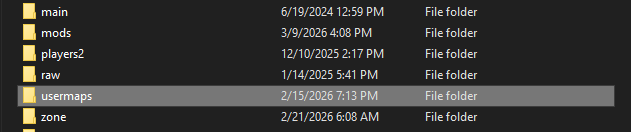
Inside of the usermaps folder, you can download any custom map and put the map folder in there. Each map has a mp_map.ff, mp_map_load.ff, and maybe a mp_map_load.paks for images.
Installing a map from a .zip
If you download a map from somewhere and it's in a .zip file, you will want to use a .zip extractor, like 7-Zip or WinRar, to extract the zip to disk as a folder. When you extract the folder, make sure it doesn't duplicate another folder of itself inside the extracted folder. To double check, make sure follows something like below for the mod to properly load and show up in the maps menu ingame:
H1-Mod
Modern Warfare Remastered
├── usermaps *(you create this folder)*
│   ├── mp_example_map
│   │   ├── mp_example_mod.ff
|   |   ├── mp_example_mod_load.ff
|   |   ├── mp_example_mod.pak
└── h1-mod.exe
Loading a map ingame
Once you setup the map, you can load the maps ingame by going to the map select menu and selecting your usermap.
Loading a map via command line
To load a map via command line or batch, you can follow something like below:
@echo off
h1-mod.exe -multiplayer +map mp_example_map
You can use +map or +devmap, and add other dvars to be set in the command line.