Loading mods
File structure
Mods for both of our clients can be loaded through a folder you create called mods in the game folder.
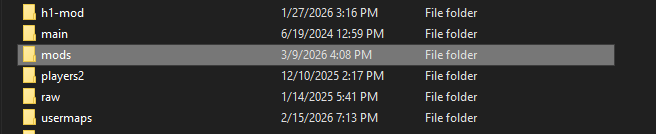
Inside of the mods folder, you can download any mod and put the mod folder in there. Each mod has a seperate f older that contains may contain a mod.ff, or GSC like scripts and maps folders, or .paks and .sabs if the mod has custom images and sounds.
Installing a mod from a .zip
If you download a mod from somewhere and it's in a .zip file, you will want to use a .zip extractor, like 7-Zip or WinRar, to extract the zip to disk as a folder. When you extract the folder, make sure it doesn't duplicate another folder of itself inside the extracted folder. To double check, make sure follows something like below for the mod to properly load and show up in the Mods menu ingame:
H1-Mod
Modern Warfare Remastered
├── mods *(you create this folder)*
│   ├── mp_example_mod
│   │   ├── scripts
|   |   |   └── example.gsc
|   |   ├── mod.ff
|   |   ├── mod.pak
└── h1-mod.exe
IW7-Mod
Infinite Warfare
├── mods *(you create this folder)*
│   ├── mp_example_mod
│   │   ├── scripts
|   |   |   └── example.gsc
|   |   ├── mod.ff
|   |   ├── mod.pak
|   |   ├── mod.sabs
└── iw7-mod.exe
Loading a mod ingame
Once you setup the mod, you can load the mod ingame by going to the dedicated Mods menu each client offers. Inside there, you will find your mod which you can load. This will trigger a vid_restart, which often refreshes the game as if it was restarting. On H1-Mod, the game may actually do a full restart to load assets that cannot be added on the fly.
Loading a mod via command line
To load a mod via command line or batch, you can follow something like below:
@echo off
h1-mod.exe -multiplayer +set fs_game "mods/mp_example_mod"